MCP Server Configuration
This guide shows how to connect MCP clients (Claude Desktop, Cursor, etc.) to Intugle.
Video Tutorial
Getting Credentials
- Navigate to your deployed ChatApp in Intugle
- Open Settings or Deploy Wizard
- Copy the MCP URL and API Key
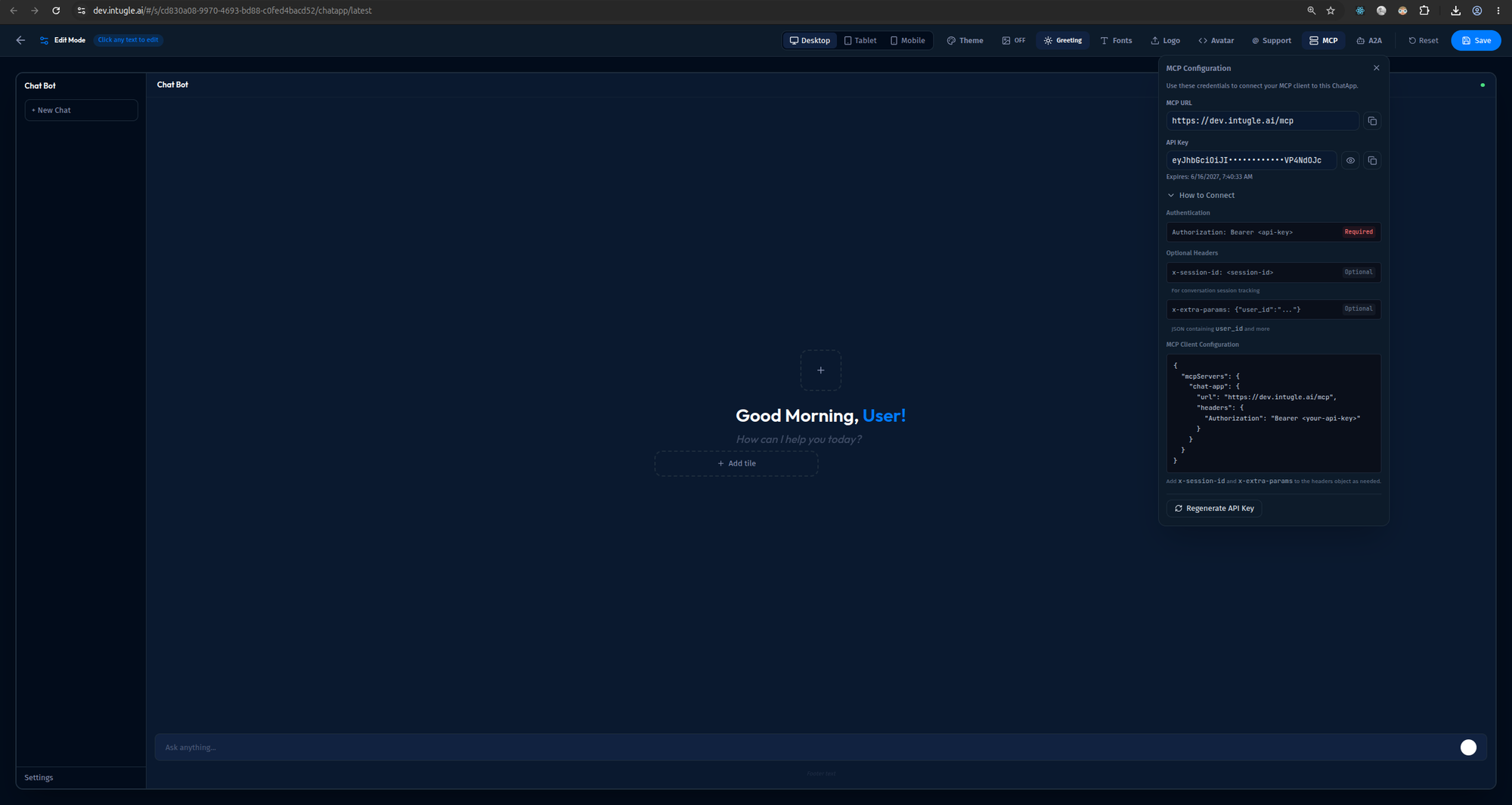
The MCP Configuration panel shows:
- MCP URL: Your endpoint (e.g.,
https://dev.intugle.ai/mcp) - API Key: Your JWT token (masked, with copy button)
- Expiration: Token expiry date
- Authentication: Required
Authorization: Bearer <api-key>header - Optional Headers:
x-session-idandx-extra-params - MCP Client Configuration: Ready-to-use JSON config for Claude Desktop
Client Setup
Claude Desktop
Edit your config file:
- macOS:
~/Library/Application Support/Claude/claude_desktop_config.json - Windows:
%APPDATA%\Claude\claude_desktop_config.json
{
  "mcpServers": {
    "intugle": {
      "url": "https://your-instance.intugle.ai/mcp/",
      "transport": "streamable-http",
      "headers": {
        "Authorization": "Bearer YOUR_API_KEY"
      }
    }
  }
}
Cursor IDE
- Open Settings → MCP Servers
- Click Add Server
- Configure:
- Name:
Intugle - URL: Your MCP URL
- Transport:
streamable-http - Headers:
Authorization: Bearer YOUR_API_KEY
- Name:
Request Reference
Headers
| Header | Required | Description |
|---|---|---|
Authorization | Yes | Bearer <JWT_TOKEN> |
x-session-id | No | Custom session ID (overrides default) |
x-extra-params | No | JSON object with extra parameters |
x-cache-payload | No | Cache configuration (see below) |
x-cache-payload Format
{
  "deterministic_cache": true,
  "cache_id": "optional-cache-key"
}
JWT Token Claims
Your API key is a JWT token containing:
{
  "subscription_id": 123,
  "subscription_uuid": "uuid-string",
  "user_id": 456,
  "chatapp_id": null,
  "exp": 1234567890
}
| Claim | Required | Description |
|---|---|---|
subscription_id | Yes | Your subscription ID |
subscription_uuid | Yes | Your subscription UUID |
user_id | Yes | Your user ID |
chatapp_id | No | Specific ChatApp ID, or "latest" for most recent |
exp | Yes | Token expiration timestamp |
Tool Reference
IntugleAgent Tool
Once connected, your MCP client can call the IntugleAgent tool.
Tool Name: IntugleAgent
Description: Agent for building data apps (data products, calculated fields, data relationships), talking with data and metadata (Data Analytics and Metadata exploration)
Input Parameters
| Parameter | Type | Required | Description |
|---|---|---|---|
question | string | Yes | A natural language question |
Example Input:
{
  "question": "What were our total sales last quarter?"
}
Example Questions
"Show me revenue by region"
"What tables are related to customers?"
"Create a chart showing monthly sales trends"
"Find the top 10 products by revenue"
"Build a calculated field for profit margin"
Response Reference
Output Structure
Responses contain a list of UI components plus metadata:
{
  "output": [
    {
      "index": 1,
      "type": "markdown",
      "content": "## Sales Summary\n\nTotal: **$1.2M**",
      "status": "completed",
      "delta": false,
      "msg": null,
      "parentid": null
    }
  ],
  "execution_time": 2.5,
  "cache": "full",
  "cache_id": "abc123"
}
Output Fields
| Field | Type | Description |
|---|---|---|
output | array | List of UI components |
execution_time | number | Time taken in seconds |
cache | string|null | "full", "partial", or null |
cache_id | string|null | Cache identifier for reuse |
UI Component Structure
| Field | Type | Description |
|---|---|---|
index | number | Component order |
type | string | "markdown", "table", "chart", or "card" |
content | string|object | Component content (varies by type) |
status | string | "partial", "completed", or "failed" |
delta | boolean | Whether this is a delta update |
parentid | string|null | Parent component ID |
Component Types
Markdown
{
  "type": "markdown",
  "content": "## Title\n\nYour **formatted** text here",
  "status": "completed"
}
Table
{
  "type": "table",
  "content": {
    "data": {
      "columns": ["Customer", "Revenue"],
      "rows": [["Acme", 150000], ["Globex", 120000]]
    },
    "title": "Top Customers",
    "column_mappings": {},
    "allow_publish": false
  },
  "status": "completed"
}
Chart
{
  "type": "chart",
  "content": {
    "chart_json": "{ ... vega-lite spec ... }",
    "title": "Revenue Trend",
    "chart_type": "line",
    "sample_data": {}
  },
  "status": "completed"
}
Card
{
  "type": "card",
  "content": {
    "title": "Total Revenue",
    "description": "$1.2M",
    "icon": "dollar",
    "right_content": "+15%",
    "right_icon": "arrow-up"
  },
  "status": "completed"
}
Session Management
- Sessions persist conversation context
- Each session is bound to a workspace
- Sessions timeout after inactivity (default: 15 seconds disconnect timeout)
- Use
x-session-idheader to maintain a specific session
Error Handling
| Error | Cause | Solution |
|---|---|---|
401 Unauthorized | Invalid/expired token | Regenerate API key |
403 Forbidden | No access to workspace | Check permissions |
408 Timeout | Query took too long | Simplify query |
Configuration Settings
Server-side settings (for reference):
| Setting | Default | Description |
|---|---|---|
MCP_TOOL_NAME | IntugleAgent | Tool name |
MCP_CLIENT_DISCONNECT_TIMEOUT_MS | 15000 | Disconnect timeout |
MCP_AUTHENTICATION_JWT_ALGORITHM | HS256 | JWT algorithm |