Bulk Question Caching
Note: The canonical source for this script is scripts/bulk_run_and_cache/ in the API repository. This copy is provided for convenience and may not reflect the latest version.
Overview
Bulk runs questions through CHATAI, waits for completion, and caches results for faster future lookups.
Supports two cache modes:
- Full: Caches the entire question execution (default)
- Partial: Caches only up to SQL generation step (faster cache hits)
Downloads
- bulk_run_and_cache.py - Main script
- sample_questions.csv - Sample questions template
Prerequisites
- Python 3.10+
httpxlibrary (pip install httpx)- Valid JWT token
- Subscription ID
Basic Usage
python bulk_run_and_cache.py \
    --csv-file sample_questions.csv \
    --api-url https://app.intugle.ai \
    --token "your-jwt-token" \
    --subscription-id 123
CLI Options
Required
| Option | Description |
|---|---|
--csv-file | CSV file with question column |
--api-url | API URL (e.g., https://app.intugle.ai) |
--token | JWT Bearer token |
--subscription-id | Your subscription ID |
Optional
| Option | Default | Description |
|---|---|---|
--concurrency | 5 | Number of parallel questions |
--timeout | 1200 | Timeout per question in seconds (20 minutes) |
--poll-interval | 5.0 | Polling interval in seconds |
--output | warm_cache_results.csv | Output file path for results |
--dry-run | - | Validate CSV without running |
--verbose / -v | - | Enable debug logging |
CSV Format
The CSV must have a question column. The cache_type column is optional.
Basic format (all questions use full cache)
question
What is the total revenue from sales in the last month?
Show me the top 10 best selling menu items
How many loyalty members do we have?
With cache_type column (mix of full and partial)
question,cache_type
What is the total revenue from sales in the last month?,full
Show me the top 10 best selling menu items,partial
How many loyalty members do we have?,full
Cache types
| Type | Description |
|---|---|
full | Cache entire execution (default if not specified) |
partial | Cache up to SQL generation step only |
If cache_type is empty or invalid, it defaults to full.
Output Format
Results are saved to CSV with the following columns:
| Column | Description |
|---|---|
question | The original question |
cache_type | Cache type used (full or partial) |
session_id | Session ID created for the question |
query_id | Query ID for the question |
status | Final status (see below) |
duration_seconds | Time taken to process |
breakpoint_step_id | Step ID used for partial caching |
not_cached_reason | Reason if caching was skipped |
output | Rendered output from the query |
error | Error message if any |
Status values
| Status | Description |
|---|---|
cached:full | Successfully cached with full cache |
cached:partial | Successfully cached with partial cache |
completed_not_cached | Query completed but caching was skipped or failed |
failed:<reason> | Query failed |
timeout | Query timed out |
error | Script error |
Not cached reasons
| Reason | Description |
|---|---|
clarification_required | Question resulted in clarification, not cached |
cache_api_failed | Query completed but cache API call failed |
query_timeout | Query timed out before completion |
query_failed_<status> | Query ended with non-completed status |
http_error | HTTP error during API calls |
exception_error | Unexpected exception during processing |
Cache Types
Full Cache
Caches the entire question execution including SQL generation and data retrieval.
When to use:
- Questions where full results should be cached
- Expensive queries where execution time matters
- Default behavior for backward compatibility
Partial Cache
Caches only up to the SQL generation step. When the same question is asked again, only the SQL generation step is replayed from cache, and fresh data is fetched.
When to use:
- Questions where SQL generation is the bottleneck
- When you want cache hits to be faster
- Questions that benefit from fresh data execution
Note: If a question marked as partial doesn't have a SQL generation step (e.g., it's a direct answer), it automatically falls back to full cache.
Clarification Questions
Questions that result in a clarification response (where the system asks for more information instead of providing an answer) are NOT cached. This is because:
- The question is ambiguous and needs user input to proceed
- Caching an incomplete answer would degrade cache quality
- The user should refine the question before it's suitable for caching
When a clarification is detected (tool_name="clarification" in stages):
- Status will be
completed_not_cached not_cached_reasonwill beclarification_required- The question is skipped for caching but still recorded in results
This applies to both full and partial cache types.
Before You Start
1. Get Your JWT Token
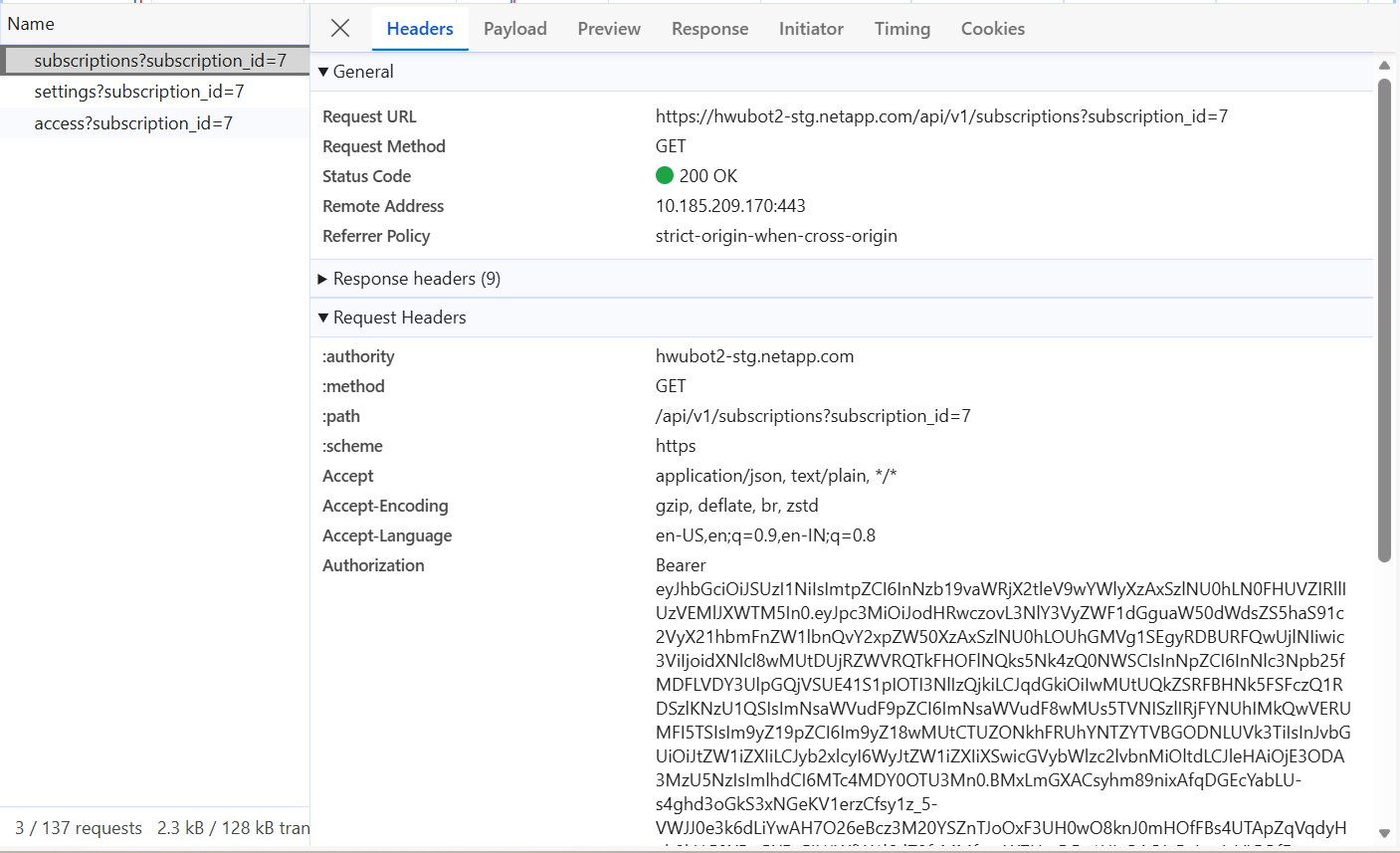
- Open browser DevTools (F12)
- Go to the Network tab
- Find any API request to
https://app.intugle.ai(e.g.,GET /api/v1/subscriptions) - Copy the Authorization header value
- Remove the
Bearerprefix - keep only the token string
Note: The token expires in 1 day. Get a fresh one if it stops working.
2. Configure Cache Settings
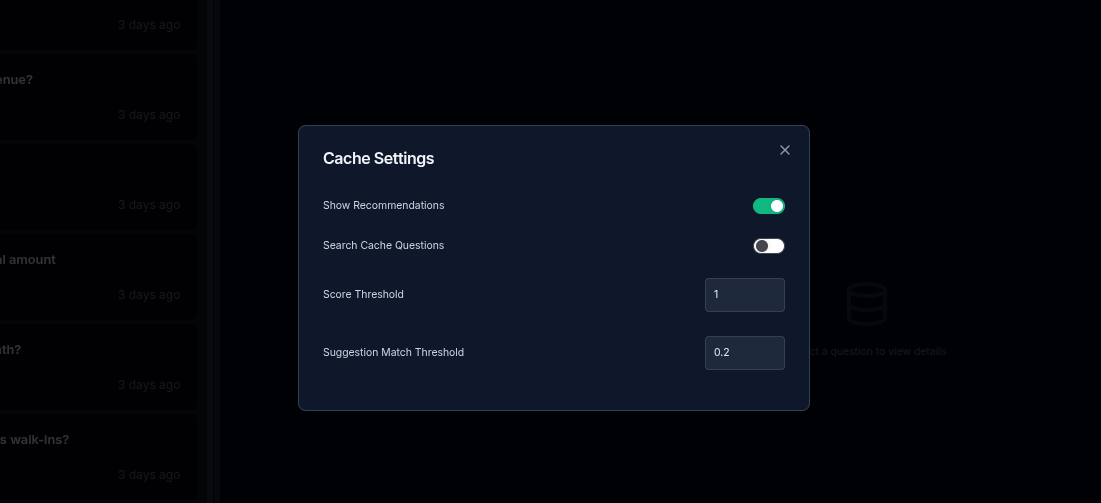
- Go to Cache settings in the app
- Turn OFF the "Search cache questions" toggle
- Set score threshold to 1.0
- Run the script
- Turn ON the "Search cache questions" toggle when done
Tips
- Use
--dry-runfirst to validate your CSV and see cache types - Use
--verbosefor debugging - Lower concurrency (2-3) for complex questions
- Results are saved incrementally (you won't lose progress if the script crashes)
- Partial cache requires CHATAI to emit
tool_namein stages