Getting Started with A2A
This guide shows how to integrate your application with Intugle using the A2A protocol.
Video Tutorial
Getting Credentials
- Navigate to your deployed ChatApp in Intugle
- Open Settings → A2A Connection Info
- Copy the A2A URL and API Key
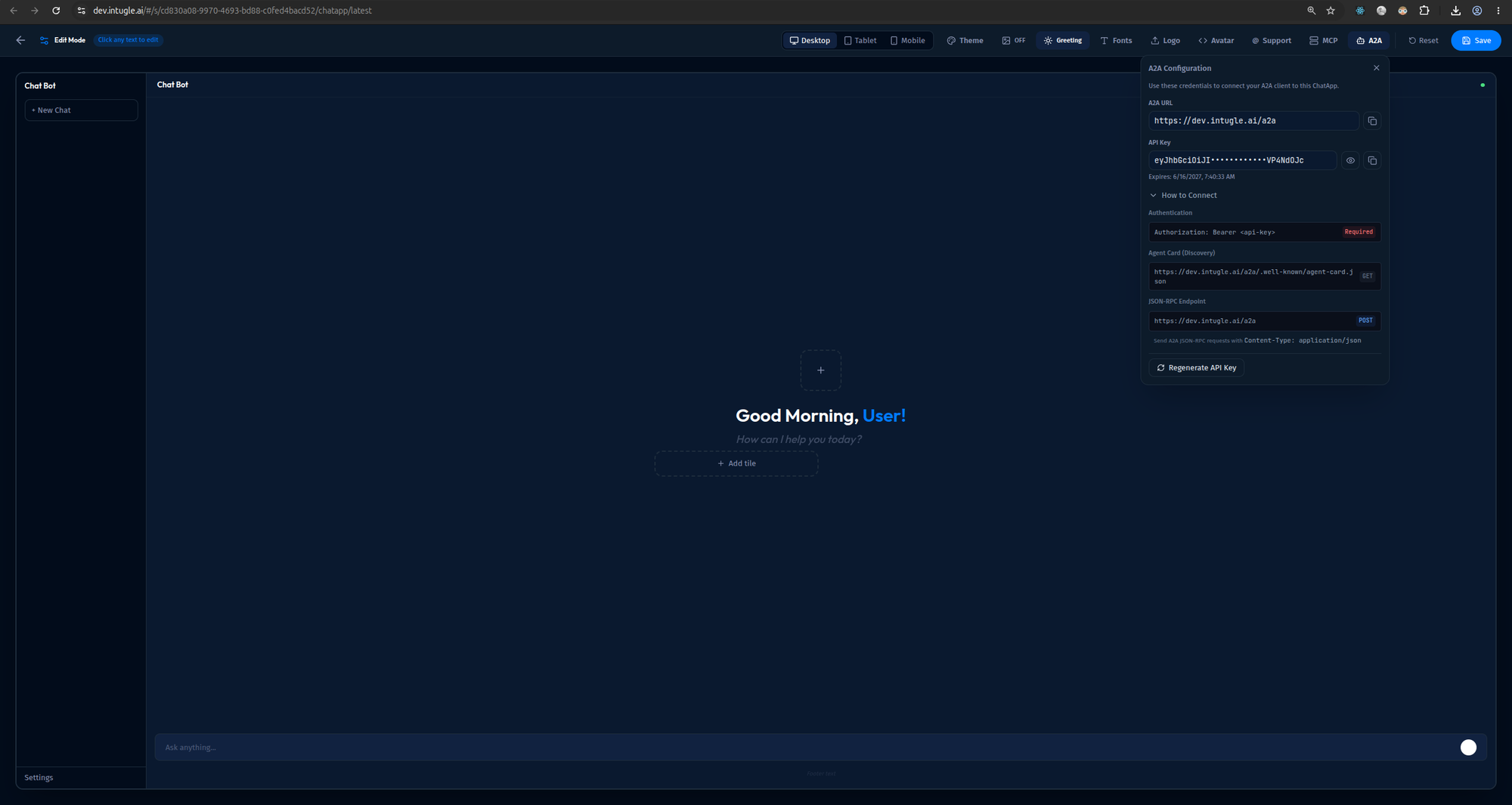
The A2A Configuration panel shows:
- A2A URL: Your endpoint (e.g.,
https://dev.intugle.ai/a2a) - API Key: Your JWT token (masked, with copy button)
- Expiration: Token expiry date
- Authentication: Required
Authorization: Bearer <api-key>header - Agent Card (Discovery):
GETendpoint at/.well-known/agent-card.json - JSON-RPC Endpoint:
POSTendpoint withContent-Type: application/json
Quick Example
Python
import httpx
import json

A2A_URL = "https://your-instance.intugle.ai/a2a/"
API_KEY = "your-jwt-token"

async def query_intugle(question: str):
    request = {
        "jsonrpc": "2.0",
        "method": "message/send",
        "params": {
            "message": {
                "message_id": "msg-001",
                "role": "user",
                "parts": [{"text": question, "media_type": "text/plain"}]
            }
        },
        "id": "1"
    }

    async with httpx.AsyncClient() as client:
        async with client.stream(
            "POST", A2A_URL,
            json=request,
            headers={
                "Authorization": f"Bearer {API_KEY}",
                "Content-Type": "application/json",
                "Accept": "text/event-stream"
            },
            timeout=300
        ) as response:
            async for line in response.aiter_lines():
                if line.startswith("data: "):
                    event = json.loads(line[6:])
                    print(event)

# Usage
import asyncio
asyncio.run(query_intugle("What were our total sales last month?"))
cURL
curl -X POST "https://your-instance.intugle.ai/a2a/" \
  -H "Authorization: Bearer YOUR_API_KEY" \
  -H "Content-Type: application/json" \
  -H "Accept: text/event-stream" \
  -d '{
    "jsonrpc": "2.0",
    "method": "message/send",
    "params": {
      "message": {
        "message_id": "msg-001",
        "role": "user",
        "parts": [{"text": "Show me revenue by region", "media_type": "text/plain"}]
      }
    },
    "id": "1"
  }'
Understanding Responses
The A2A server streams Server-Sent Events (SSE):
data: {"type": "task.created", "task": {"id": "task-123", "state": "submitted"}}
data: {"type": "task.updated", "task": {"id": "task-123", "state": "working"}}
data: {"type": "artifact.updated", "artifact": {...}}
data: {"type": "task.updated", "task": {"id": "task-123", "state": "completed"}}
Task States
| State | Description |
|---|---|
submitted | Request received |
working | Processing in progress |
input_required | Waiting for user input |
completed | Success |
failed | Error occurred |
canceled | User canceled |
Handling Events
async for line in response.aiter_lines():
    if not line.startswith("data: "):
        continue

    event = json.loads(line[6:])
    event_type = event.get("type")

    if event_type == "task.updated":
        state = event["task"]["state"]
        if state == "completed":
            print("Done!")
        elif state == "failed":
            print(f"Error: {event['task'].get('error')}")

    elif event_type == "artifact.updated":
        artifact = event["artifact"]
        # Process markdown, table, chart, or card
Session Continuity
Use context_id to maintain conversation context:
# First message
request1 = {
    "jsonrpc": "2.0",
    "method": "message/send",
    "params": {
        "message": {
            "message_id": "msg-001",
            "context_id": "session-abc",  # Set context
            "role": "user",
            "parts": [{"text": "Show me sales by region", "media_type": "text/plain"}]
        }
    },
    "id": "1"
}

# Follow-up message (uses same context)
request2 = {
    "jsonrpc": "2.0",
    "method": "message/send",
    "params": {
        "message": {
            "message_id": "msg-002",
            "context_id": "session-abc",  # Same context
            "role": "user",
            "parts": [{"text": "Now filter to Q4 only", "media_type": "text/plain"}]
        }
    },
    "id": "2"
}
Next Steps
- API Reference - Complete input/output specifications